Developer documentation
More about SmartPeak: SmartPeak automates targeted and quantitative metabolomics data processing
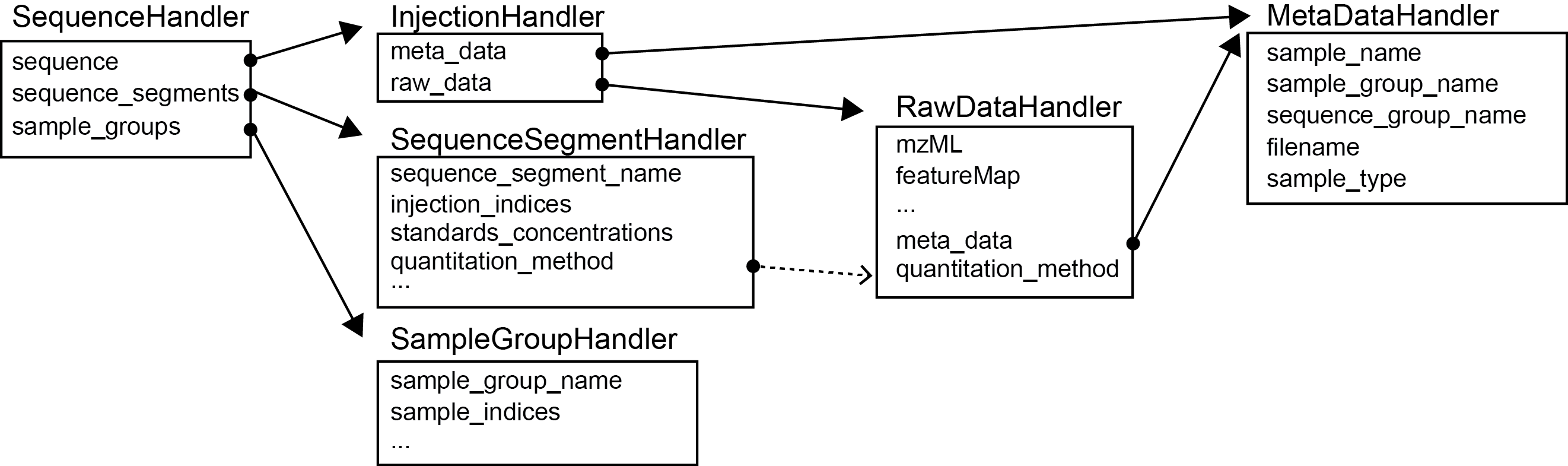
Symbolic data workflow

Class diagram
Continuous integration and delivery
SmartPeak is equipped with two CircleCI workflows which allow developer to integrate and release changes on daily basis.
Continuous integration (ci)
Currently SmartPeak is built on three target platforms: Windows, Ubuntu 20.04 and macOS 11 using x86-64 architecture by default.
To access building platform follow CircleCI AutoFlowResearch/SmartPeak.
Continuous delivery (release)
The release workflow prepares SmartPeak source code for a build, next it builds SmartPeak on each target platform and finally it pushes binary to an artifactory.
The prepare_release job updates SmartPeak version, making sure that version is correctly embedded in the source code. The SmartPeak code is built on three platforms sharing jobs with ci workflow.
Provided that both build and tests passed successfuly, the publish_release job tags the release branch, pushes all artifacts to GitHub repository release page,
and creates a pull request to merge changes from the release branch to develop.

A screenshot of CircleCI release workflow
Make release
There are 3 ways to trigger release workflow on continuous integration platform.
Create release branch matching pattern
release/{major}.{minor}.{patch}. One of the precondition for successful release is that next release has to be higher than the last one.Include one of following strings in commit message:
(release bump major|minor|patch)to increment specified component of the version or(release set {major}.{minor}.{patch})to give the full version string. The release is triggered only on the commit that triggered the CI workflow (last commit) on develop branch.Trigger release from bash (only linux), instruction below:
# Add paths (you can also add them in ~/.bashrc)
export PATH="$PATH:$PWD/tools/smartpeak"
export PYTHONPATH="$PYTHONPATH:$PWD/tools"

# To bump specified component, e.g.:
smartpeak_release --bump minor

# or by giving the whole version:
smartpeak_release --set-version 1.3.7
Note
The script is a form which allows for quick configuration of new release.
Asks to modify changelog.
Asks to include commit messages in the changelog since last release.
If developer approves changes, it automatically pushes release branch and triggers the release.
Warning
The project does not require local build to trigger release from the script.